Transform Photos with Color Dust Photoshop Actions
There’s a certain kind of visual magic that stops a viewer mid-scroll. It’s that ethereal, dreamlike quality where a portrait or a landscape seems to exist in a world painted with light and pigment. Achieving this effect manually in Photoshop often requires a deep understanding of blending modes, gradient maps, and particle brushes—a process that can take hours of meticulous layering. The Color Dust Photoshop Actions package is designed to bridge that gap, offering a sophisticated, one-click solution that transforms standard photography into vibrant, artistic compositions without requiring advanced technical expertise.
The Anatomy of the Color Dust Effect
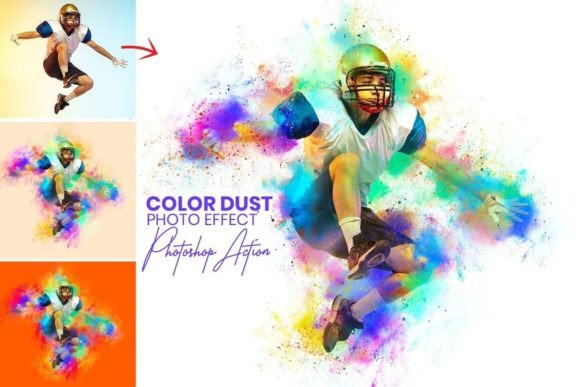
Visually, the Color Dust Photo Effect is characterized by a dispersion of vivid, abstract particles that seem to explode from or settle onto the subject. Unlike a simple overlay, these actions utilize complex algorithms to interact with the light and shadow information in your original image. The result is a texture that feels integrated rather than pasted on. Depending on the source image, the effect can range from a subtle shimmer of bokeh-like specs to a dramatic, painterly explosion of pigment. This stylistic versatility makes it a powerful tool for modern typography and layout design, where the background imagery needs to support, rather than compete with, the text hierarchy.
The visual personality of this effect leans heavily into the "creative" and "artistic" categories. It suggests movement, emotion, and energy. For a brand identity looking to convey innovation or creativity, these textures provide a distinct signature. It is not a static, flat background; it is a dynamic layer of visual interest that adds depth to editorial design, packaging design, and social media graphics.
Strategic Applications: Beyond the Basic Portrait
While the obvious application is enhancing photography, the true value of a premium font or asset lies in its adaptability across different mediums. The Color Dust Photoshop Actions are no exception. Here is how different professionals can leverage this tool:
- Logo Design and Branding: Use the effect to create unique hero images for a website landing page or to texture a logotype. When combined with a strong sans serif font, the organic dust effect creates a beautiful contrast between structure and chaos, a hallmark of modern typography.
- Marketing and Advertising: In crowded digital spaces, social media graphics need to pop. Applying a subtle color dust effect to product photography can add a sense of luxury or whimsy, increasing click-through rates. It helps in establishing visual consistency across a campaign.
- Publishing and Editorial: For book covers or magazine spreads, particularly in genres like fantasy, romance, or lifestyle, the effect adds a narrative layer. It can suggest magic, nostalgia, or high energy, influencing the reader's emotional engagement before they read a single word of copy.
- Personal Projects and Hobbyists: For crafters and bloggers, this is a gateway to professional-looking design assets. It allows for the creation of digital scrapbooking elements, unique stationery, or eye-catching blog headers that stand out from generic stock templates.
Practical Workflow and Customization
The technical barrier to entry is intentionally low, but the customization potential is high. The package includes Photoshop Atn format (action files) and Photoshop Abr. format (brush files). This combination allows for a non-destructive workflow. Once the action is played, the effect is generated on separate layers. This is crucial for professional work, as it allows you to mask out areas where you want the subject to remain sharp or adjust the opacity of the dust particles to suit the mood.
Furthermore, the inclusion of 10+ unique color adjustments means you are not locked into a single palette. You can shift the dust to match specific brand guidelines or the color theory of your existing layout. Whether you need warm, sunset tones for a lifestyle brand or cool, neon particles for a tech startup, the flexibility is there. This adaptability ensures the tool remains a staple in your library of design assets rather than a one-trick pony.
Evaluating Fit and Readability
When incorporating such a heavy visual effect, the primary concern for any designer or marketer should be readability. A background that is too busy can render text illegible, destroying the visual hierarchy. The key to using Color Dust Photoshop Actions effectively is balance.
If you are overlaying text, consider using the dust effect only on the periphery of the image, leaving negative space for headlines. Alternatively, place a semi-transparent shape or a slight gradient behind your text to ensure the typeface remains legible. This effect pairs exceptionally well with clean, geometric sans serif fonts or bold serif fonts that have enough visual weight to cut through the texture. Avoid pairing it with overly ornate script fonts or handwritten fonts unless the text is very large, as the detail in the dust might clash with the loops and swirls of the lettering.
Ultimately, the Color Dust Photoshop Actions serve as a bridge between raw photography and finished art. They provide a consistent, repeatable method for adding emotional resonance and visual flair to projects ranging from web design to print. By understanding the mechanics of the layers and respecting the principles of modern typography, you can use this tool to significantly elevate the professionalism and impact of your creative output.